

November 17, 202612 min read
BOPIS strategy: how retailers make buy online, pick up in store work


Buy online, pick up in store (BOPIS) lets a shopper order on your site or app and collect the order at a nearby store, often the same day. It's one of the pickup options many retailers group under click and collect, and our glossary covers the full BOPIS definition and how it compares to curbside and ship to store.
Shoppers keep using it. In May 2026, 29% of US digital buyers picked up an online order in store, up from 22% in 2023, according to eMarketer and Bizrate Insights.
Most BOPIS guides cover the logistics: inventory sync, staging shelves, signage, and pickup notifications. Those matter, and this guide covers them too. What breaks more often is the conversation around the order, before and after checkout, when a shopper wants to know whether their store has their size or whether their order is ready yet, and the only answer on hand is a confirmation email written for everyone.
Why BOPIS belongs in your omnichannel retail strategy
For shoppers, the appeal is simple. They get the item sooner than shipping would allow, and they skip the shipping fee. For you, a pickup order brings a customer through the door, where they can see the rest of the store, and it moves the last mile onto the shopper's own trip, which saves what you'd have spent shipping that order to a home address.
There's also a link to conversion. Digital Commerce 360's analysis of its Top 1000 retailers found that retail chains offering BOPIS converted at 3.4% in 2025, compared with a 2.9% average across all Top 1000 retail chains. That's a correlation, and chains that offer pickup tend to differ in other ways too, so the gap doesn't prove pickup caused the lift. Curbside is an interesting contrast: retail chains offering it converted at 4.1% in 2025, yet the share of Top 1000 retail chains offering curbside fell from 53.9% in 2021 to 24.9% in 2025.
Pickup works best as one part of a wider plan for how your online and in-store channels connect. If you're building that plan, start with what an omnichannel customer experience looks like.
Where BOPIS goes wrong
Most BOPIS failures happen in the gap between what the website promised and what the store can deliver. Four of them come up again and again.
Inventory that's wrong by the time the shopper arrives
Your product page says three are in stock at the Elm Street store. By the time the order reaches an associate, one has sold at the register and another turns out to be damaged. Store inventory moves faster than most systems sync, so the number on the page can be hours old. A common fix is a safety buffer: show an item as available for pickup only when the store count is above a set threshold, which gives up a few sales in exchange for far fewer broken promises.
Partial orders and substitutions
When one item in a three-item order can't be found, someone has to decide what happens next. You can hold the whole order, release what's there, offer a substitute, or refund the missing item. Order management platforms handle the mechanics of a partial pickup. What the shopper notices is whether anyone asked them first, so pick your default before launch and make sure the shopper hears about the change before they're standing at the counter.
Orders nobody picks up
Every pickup program has orders that sit on the shelf. The usual sequence is a ready notification, a reminder a day or two later, a hold window stated up front, and then cancellation and a refund when the window closes. Each uncollected order ties up inventory that could have sold to someone else, plus the shelf space it's sitting on. Shoppers miss pickups for ordinary reasons: plans changed, they forgot, or they wanted to ask whether a friend could collect it and never got an answer.
A slow or confusing handoff at the store
The shopper walks in, can't find the pickup counter, and then waits behind the returns line once they do. Clear signage, a dedicated pickup spot, and an associate who can pull the order quickly do most of the work here. You'll also want a simple way to confirm the right person is collecting the order, such as the order number plus a name or ID check.
BOPIS is where online and in-store have to meet
Most retailers run their website, their stores, and their customer service on separate systems, and each one has its own idea of who the customer is. Shoppers rarely notice until they place a pickup order, because pickup is the moment that needs all of those systems at once. Picture a shopper who asks in chat whether a jacket comes in tall sizes, orders it for pickup, and then gets in touch again to ask whether their partner can collect it. The associate at the counter sees none of that history, only an order number.
What pickup needs from a unified customer record
You don't need a full customer data platform to fix this. For pickup, the record has to answer a short list of questions for whoever is helping the shopper:
What did they order, and when?
What's the order's status right now?
Did they ask about or change anything before arriving?
Who's allowed to collect it?
What have they bought before, and are they a loyalty member?
If the associate at the counter and the team member answering chat can both see that, most pickup problems get solved by whoever the shopper reaches first.
Touchpoints to connect first
Beyond pickup, look at the other moments where shoppers cross from one channel to another. Buy online, return in store is the closest, because the return desk needs to see the online order. Loyalty at the counter matters too, so points and member pricing apply no matter where the purchase started. Then there's customer service, where every channel should sit on one thread so a question asked in chat is visible when the same shopper calls. Our glossary entry on omnichannel customer service goes deeper on that last one.
Start smaller than a full systems integration
Connecting every system at once is a long project. A lighter start is to route pickup questions from every channel into one place, and to let store associates see that conversation history for pickup orders. That alone means the shopper who asked about tall sizes in chat doesn't have to explain it again at the counter.
Shared history at the counter is one of the more visible benefits of an omnichannel customer service experience.
The questions shoppers ask around a pickup order
Most retailers answer pickup questions in a confirmation email or a static FAQ page. That covers the general case, like store hours, where the pickup counter is, and how long you'll hold an order. It doesn't cover questions about one shopper's order, such as whether my order is ready or whether my store has the boots in my size, and those are the questions that turn into calls and chats.
Before they buy
Is it in stock at my store, in my size or color?
How fast will it be ready?
Can I pay in store?
Each of these stands between a browsing shopper and a purchase. If the answer takes a day to arrive by email, the shopper may buy from whichever retailer answered first.
After they buy
Is my order ready?
Can someone else pick it up?
Can I change the store or the pickup time?
How long will you hold it?
What happens if an item is missing?
These arrive after the confirmation email has gone out, and each one needs live order data to answer correctly. For orders shipped to a home address, the same pattern shows up as where-is-my-order questions, which our guide to Shopify order tracking walks through.
How agentic commerce changes BOPIS
Agentic commerce is AI that can act for the shopper inside the buying conversation, answering product questions, checking availability, and completing the purchase. For pickup, it means you can answer the questions above in the conversation, from your own data.
Before the sale, AI connected to your inventory and order systems can tell a shopper whether their nearest store has the item, explain your pickup policy, and suggest products based on what they've bought before. Gladly recommends from a customer's history across visits and handles checkout in the conversation with no redirect, so the shopper asking about tall sizes can order for pickup without leaving the chat.
After the sale, the same AI answers status and change questions from live order data. Gladly handles order tracking, cancellations, refunds, and returns in the same thread, and when a question needs a person, it hands the conversation to a team member with the full history attached. Gladly also keeps one conversation thread per customer across chat, SMS, voice, email, and social, so a pickup question asked before purchase is still there when that shopper gets in touch again.
The AI you run on your own channels works from your inventory and order data and knows each shopper's history, and that's what pickup questions depend on. To see what it looks like on a storefront, explore the AI shopping assistant.
Try Gladly AI right here
Fielding the same pickup questions all day? Ask Gladly AI.
Get a practical answer in seconds, from AI built for retail.
BOPIS metrics to track
Most BOPIS metric lists focus on store operations. Start with the customer side, because that's where you'll see whether pickup is helping shoppers or frustrating them.
Customer-side metrics
Pickup share of online orders: the percentage of online orders placed for in-store pickup.
Conversion rate on pickup-eligible products: how often shoppers who view a product available for pickup go on to buy it. Our ecommerce conversion rate optimization framework covers how to test changes that move it.
Contacts per pickup order: how many times shoppers reach out about each pickup order. Our contacts per order entry explains how to calculate it.
Share of pickup questions answered without a person: the percentage of pickup questions resolved by self-service or AI with no handoff.
Uncollected-order rate: the percentage of pickup orders canceled because nobody collected them.
Store-side metrics
Order-to-ready time: how long it takes from order placement to the order being staged for pickup.
On-time-ready rate: the share of orders ready by the time you promised.
Order accuracy at handoff: the share of orders handed over complete and correct.
In-store add-on sales at pickup: what pickup customers buy beyond their order while they're in the store.
Benchmarks vary widely by category and store format, so track your own trend over a few months before comparing yourself to anyone else.
BOPIS best practices
Use this checklist before launch, and again whenever pickup complaints start to climb.
Show accurate store inventory on the product page, with a buffer for items that sell fast in store.
Promise a ready window you can beat, with extra time built in for busy hours.
State your hold policy before checkout.
Answer pickup questions where the shopper bought, in the same conversation, from live order data.
Give associates at the counter the shopper's conversation history.
Decide ahead of time what happens when an item is missing, and tell the shopper before they arrive.
If you only fix one thing this quarter, make it the last mile of the conversation: answer pickup questions where the shopper bought, from live order data.

Frequently asked questions
Recommended reading

What Is omnichannel customer experience?
Omnichannel customer experience occurs when customers interact with brands with the channel (or channels) of their choice. Read more.
By
Angie Tran

5 benefits of delivering an omnichannel customer service experience
Use omnichannel customer service to establish brand loyalty
By
Angie Tran
Ecommerce conversion rate optimization, a complete framework
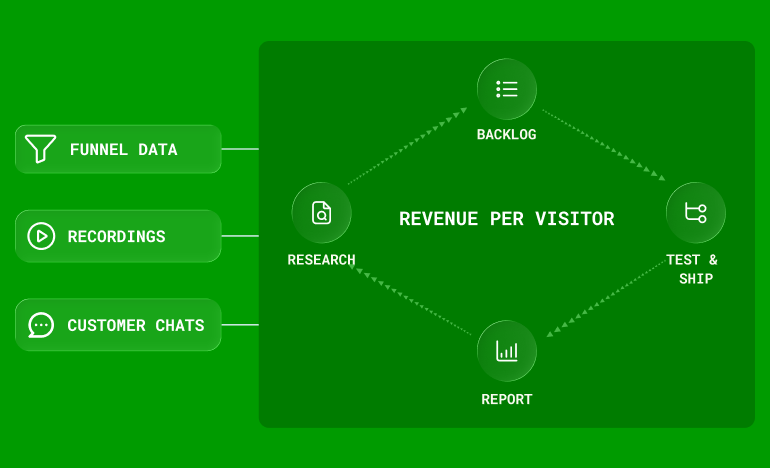
How to run ecommerce CRO as a monthly program: research that feeds a backlog, where to focus first, how to sequence tests, and how to report wins in revenue.
By
Andrew Bennett