

November 23, 20269 min read
Zero-party data vs. first-party data: what's the difference?


Zero-party data is information a shopper tells you on purpose, like their size or who they're buying a gift for. First-party data is what you collect directly from your own customers, and most of it comes from watching what they do in your store: what they browse, buy, return, and click. You need both, and they fail in different ways.
This guide sorts what a typical online store collects into each type, adds second- and third-party data so you can see the full ladder, and covers a question most explainers skip: when to believe what a shopper says and when to believe what they do. The examples come from the tools a store already runs, like Shopify, an email and SMS platform, a loyalty app, and the help desk.
Zero-party vs. first-party data at a glance
The two differ most in who hands the data over and in what it can and can't tell you.
The main differences side by side
Zero-party data | First-party data | |
|---|---|---|
Who provides it | The shopper, on purpose | You observe it from what shoppers do |
How it's collected | Quizzes, preference centers, forms, and conversations | Orders, site and app behavior, email and SMS engagement, and support history |
What it tells you | What shoppers say they want, and why | What shoppers actually did |
Ecommerce examples | A size from a fit quiz, a gift recipient, "I'm on my feet all day" | Order history, pages viewed, items returned, emails opened |
Main weakness | Shoppers can be wrong, aspirational, or out of date | It shows what happened but not why |
What zero-party data is
Forrester Research coined the term. In the definition Salesforce's explainer quotes, zero-party data is data a customer "intentionally and proactively shares with a brand." It can include preference center answers, purchase intentions, personal context, and how the person wants the brand to recognize them.
In a store, that looks like a size entered in a fit quiz, a skin type picked in a preference center, a note that an order is a gift, or a request to hear about new arrivals only. The test is whether the shopper chose to tell you. If you worked it out from their clicks, it's first-party data, however confident the guess.
Conversations belong on this list too, and few explainers give them more than a passing mention. A shopper who writes in with "I'm on my feet all day, which boot should I get?" or "I sized up last time" is volunteering intent in their own words, with no quiz to fill out.
Be precise about which part is which. What the shopper chooses to tell you in a conversation, like what they need and who it's for, is zero-party data. The data around it, like the page they were on and what they bought afterward, is first-party data. One chat transcript holds both.
What first-party data is, and what your store already collects
First-party data is what you collect directly from your own customers and channels. Most of it comes from observing how shoppers use your store and talk to your team. Some guides count zero-party data as a kind of first-party data, since you collect it directly too. This one keeps them apart because they fail in different ways. Here's how a typical direct-to-consumer stack sorts out:
Ecommerce platform: orders, order values, returns, and discount codes used.
Site and app behavior: pages viewed, searches, and items added to the cart.
Email and SMS platform: opens, clicks, and subscription status.
Loyalty app: tier, points balance, and redemptions.
Help desk: which channel each customer used, how often they contacted you, and how each conversation was resolved.
Most of this sat in separate tools for years before anyone called it first-party data. You collected it from your own customers, and no outside company controls access to it, which is the practical difference from the third-party data covered below.
First-party data tells you what happened and is weaker on why. A shopper who looks at the same boot several times and never buys it could be waiting for a sale or unsure about the fit, and the data alone can't tell you which.
How second- and third-party data fit in
If you're comparing types of data, you'll run into two more:
Second-party data is another company's first-party data, shared with you directly. A brand and a retailer that agree to share purchase data with each other is a common example.
Third-party data is collected by a company with no direct relationship to the shopper, then packaged and made available through ad platforms and data providers. You get reach and little context about where it came from.
Older guides tie this ladder to a deadline: third-party cookies are going away, so build first-party data now. For Chrome, that hasn't happened. In an April 2025 update, Google said Chrome would keep its current approach to third-party cookie choice and wouldn't roll out a new standalone prompt for it. The case for building on data you collect yourself doesn't need a deadline: you know where it came from, and shoppers can correct it.
When to trust what shoppers say vs. what they do
Zero-party data comes straight from the shopper, which makes it a strong signal. It's still self-reported, and self-reported data has its own errors. Salesforce's explainer says as much: not everyone self-reports accurately. Its example is a web form where a large number of visitors show up as accountants, which happens to be the first option in the dropdown.
A workable split is to trust what shoppers say about things only they know: the size they wear, who a gift is for, how often they want to hear from you, a material they avoid. Trust what they do about what holds their attention and what they'll pay for. Someone who says they care about sustainable materials can still buy the cheapest option every time.
When the two disagree, treat the gap as a question to ask. Say a shopper's fit quiz lists a medium, and their order history shows two mediums, both returned. Neither record explains that alone, and together they suggest the quiz answer is off. The next time that shopper asks about a jacket, the useful move is to ask: "You've sent back two mediums. Want to try a large?" If they say yes, update the stored size so the next recommendation starts from the right answer.
Stated answers also go stale. A fit quiz from two years ago describes the shopper who took it. Let people edit what they told you, and ask again when their behavior stops matching.
How each type is collected
First-party data mostly comes from tools you already run, while zero-party data comes from asking shoppers. Each takes different work, so they're covered separately below.
First-party data sources you already have
Most first-party collection is a matter of connecting what you have. Check that your ecommerce platform, email and SMS tool, loyalty app, and help desk share a customer ID, such as an email address, so one shopper shows up as one person. Until they do, each tool holds its own partial version of the shopper.
Zero-party data: quizzes, preference centers, and conversations
Quizzes and preference centers work for structured answers, like size, skin type, and whether an order is a gift. Conversations capture the answers you didn't think to build a field for.
Whatever the method, ask at the moment the answer is useful. A product question, a size check, and a return reason are all times when a shopper is already telling you something. A shopper who gets a better recommendation right after answering has a reason to answer again.
Consent and transparency basics
Tell shoppers what you're asking for and what you'll do with it, and give them a way to change their answers. Volunteering data doesn't switch off consent and privacy rules, so check with your legal team on how they apply to your business. Take extra care with sensitive categories like health, and keep them off homepage banners.
Putting both on one customer profile
Zero-party and first-party data are most useful in the same place. A stated size in one tool and a return history in another means nobody sees the mismatch. If you're building that unified record, our guides to building a single customer view and to customer data platforms vs. CRMs cover the identity and tooling decisions.
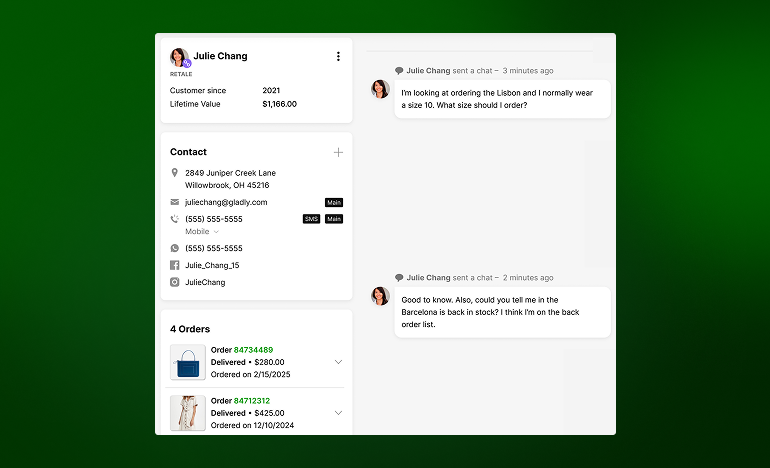
The conversation is the piece that's easiest to lose. Shoppers tell your team which size ran small, why they're returning something, and what they're shopping for next, and that can stay in a help desk where marketing never sees it. Gladly puts every conversation, across chat, email, SMS, voice, and social messaging, on a single customer timeline, with Shopify order data in the profile and Klaviyo consent status and recent marketing emails next to the conversation.
For the conversation itself, Gladly's AI shopping assistant answers product questions, recommends items based on what the shopper says, and uses order and conversation history if they've shopped with you before. Our guide to website personalization covers how to put all of this to work on the site.
Try Gladly AI right here
Collecting what shoppers tell you? Ask Gladly AI.
Get a practical answer in seconds, from AI built for retail.

Frequently asked questions
Recommended reading
Website personalization for retail brands that think brand-first
A practical guide to website personalization for ecommerce brands at any traffic level, from segments and merchandising to one-to-one conversations.
By
Angie Tran
How to build a single customer view for ecommerce personalization
A guide to building a single customer view for ecommerce, from data sources and identity resolution to a live record your team and AI use mid-conversation.
By
Gladly Editorial

Customer data platform vs. CRM: what’s the difference?
How a CDP and a CRM differ, when an ecommerce brand needs a CDP alongside its CRM, and how to connect them so every team sees the same customer.
By
Gladly Editorial