


November 19, 202613 min read
Shopify Agentic Storefronts: what it is and how to manage it


If you run a Shopify store, Agentic Storefronts is probably already on. Shopify turns it on by default for eligible stores, so your products can show up when someone asks ChatGPT or Copilot what to buy. It's the center of Shopify's agentic commerce push, and you can check where it stands in your admin today. We cover it from the support side, alongside the rest of our Shopify customer service guides.
This guide covers what Agentic Storefronts is, which AI channels it reaches, how to sell on ChatGPT with Shopify, how to manage or turn it off, what to fix first, and what happens after an AI channel makes a sale. The Shopify settings and limits below come from Shopify's own help pages, announcements, and changelog, which we checked in November 2026.
The short version
Agentic Storefronts is on by default for eligible stores. You manage it at Sales channels > Agentic in your Shopify admin.
ChatGPT sends shoppers to your own checkout. Google AI Mode and Gemini, Microsoft Copilot, and Meta can check shoppers out inside the chat where direct checkout is available.
Shopify's help pages list no added selling fees on these channels, only your standard payment processing.
Orders land in your Shopify admin and you keep the customer relationship, so where-is-my-order questions and returns still come to your team.
What Shopify Agentic Storefronts is
Agentic Storefronts is a Shopify feature that sends your product catalog to AI chat channels, so shoppers can find and buy your products inside those chats. It works through Shopify Catalog, which lists your products with their titles, descriptions, options, images, prices, and availability in a form AI agents can parse. Brands that don't use Shopify for their online store can use the Agentic plan to add products to Catalog too. If agentic commerce is new to you, our glossary entry covers the basics.
Shopify announced Agentic Storefronts in its Winter '26 Edition on December 10, 2025, naming ChatGPT, Perplexity, and Microsoft Copilot as the first platforms. On March 24, 2026, it said millions of merchants could start selling to ChatGPT users that week. On May 11, 2026, the feature got its own page in the admin. Perplexity was named at launch but isn't on Shopify's current channel list.
Which AI channels Shopify Agentic Storefronts covers
Shopify's help center lists four channels as of November 2026. The list changes, so check the linked pages before you decide anything.
Channel | How the shopper pays | Who can buy |
|---|---|---|
ChatGPT | On your store's checkout, in ChatGPT's in-app browser or a new tab on ChatGPT web | Your store must sell to US customers |
Google AI Mode and Gemini | Direct checkout in the chat, by credit or debit card, on by default and rolling out gradually | Customers in the US, Canada, and Australia; products must be in Google Merchant Center |
Microsoft Copilot | Direct checkout in the chat, on by default | Customers in the United States |
Meta, including Muse | Direct checkout on Meta surfaces, on by default | Customers in 11 countries, including the US, UK, Canada, and Australia |
Each channel has its own requirements and limits. Shopify documents them on its pages for ChatGPT, Google AI Mode and Gemini, Microsoft Copilot, and Meta.
Direct checkout means the shopper pays inside the chat and may never visit your site. If you turn it off for a channel, shoppers can still find your products there and finish buying on your store.
Shop Pay can also appear as a payment option in Muse, with no separate setup. Our agentic checkout guide covers Shop Pay in AI agents in its own section, and its table of where agentic checkout is live today includes surfaces outside Shopify's channels.
How to sell on ChatGPT with Shopify
If your store is eligible, you're already selling there. Shopify says eligible products are discoverable through Shopify Catalog, so you don't need to install an app or maintain a separate ChatGPT product feed. ChatGPT needs four things from your store:
You sell to customers in the United States. Your store can be based anywhere.
Your products are eligible for Shopify Catalog.
Your Terms of service, Privacy policy, and Return and refund policy are completed in Settings > Policies.
You've agreed to the Shopify Agentic Storefronts Supplemental Terms of Service.
With those in place, ChatGPT works as a discovery channel. Shoppers find your products there and buy on your own checkout, which opens in ChatGPT's in-app browser or in a new tab on ChatGPT web, so your branding, customizations, and payment methods all apply. Put any legal disclosures your products need within the first 6,000 characters of the product description.
The ChatGPT Business app
Shopify's ChatGPT page also describes a separate ChatGPT Business app. It's optional, and it lets you claim your business profile. Shopify says claiming it through the app verifies your business automatically through your store, and managing the profile in the ChatGPT Business Hub adds a separate Persona verification step. In the US, eligible stores can also set up a business agent that recommends products and answers questions, but it can't complete purchases for customers. Business profiles and agents are separate from ChatGPT ads.
How to check and manage Agentic Storefronts in your admin
Go to Sales channels > Agentic in your Shopify admin. You need to be the store owner or a staff member with the right permissions, and changing settings takes the Manage and install apps and channels permission. If the section is missing, it may have been unpinned from your sidebar. Shopify's managing page has the details.
The default setting is "Allow Shopify to manage for me." While it's on, agentic storefronts can access your products through Shopify Catalog, direct checkout is on for the channels that offer it, and you're enrolled in new storefronts and features automatically. Turn it off and you can manage Catalog access, auto-enrollment, direct checkout, and each channel yourself. Turning it back on reactivates all of those settings, including direct checkout.
For each AI channel, you can see sales, orders, online store sessions, and online store conversion. The default range is the last 30 days, and you can set a custom range. Performance analytics aren't available yet for headless stores.
How to turn off Agentic Storefronts in Shopify
The steps are the same for every channel except the toggle in step 4. Shopify documents them on each channel's page:
In your Shopify admin, go to Sales channels > Agentic.
Turn off "Allow Shopify to manage for me."
Click the channel: ChatGPT, Microsoft Copilot, Google AI Mode and Gemini, or Meta AI and Muse.
Turn off "Shopify Catalog access" (ChatGPT, Copilot, and Meta) or "Direct checkout" (Google, Copilot, and Meta).
Click Save.
If you'd rather keep a channel's discovery and stop in-chat purchases, turn off Direct checkout for that channel instead. ChatGPT has no direct checkout option, since shoppers already buy on your store. On the other channels, shoppers can still find your products and finish on your store.
Turning off Catalog access doesn't fully remove your products. Shopify's ChatGPT, managing, and products pages add three caveats:
Product data can keep being shared through Shopify Catalog for up to 7 days after you turn off access.
Turning off Catalog access doesn't stop ChatGPT, Copilot, or Meta from showing or referencing your products through web crawling and indexing. It also leaves your Catalog listings on other platforms, such as Shop, in place.
To hide a product completely, set its status to Unlisted. Shopify cautions that Unlisted products are also hidden from sitemaps, search engines such as Google, and your online store search, so use it for specific products and not your whole catalog.
What to fix before AI channels show your products
If you're leaving it on, two things decide how your products look in AI chats: your Catalog data and your knowledge base.
Your product data in Shopify Catalog
Shopify updates Catalog continuously, so AI channels show whatever your product pages say today. If your real titles or descriptions live in custom fields, Shopify's Channel mapping page lets you customize how that data is read, using metafields, metaobjects, tag prefixes, or title separators. You can also group variants so they appear as one listing, and choose whether the list price is the current price or the compare-at price. Shopify's May changelog adds that the Agentic page shows which queries your products rank for and recommends improvements to your product data.
For general product data cleanup, our guide to preparing your product feed for AI agents applies here too.
Your knowledge base
AI agents answer non-product questions from your knowledge base: returns, shipping times, payment methods, contact details. Shopify calls it the source of truth for those questions, and agents query it when a shopper asks in an AI chat. You'll find it at Sales channels > Agentic > Sources > Knowledge Base, and it holds up to 1,000 facts. It replaces the old Shopify Knowledge Base app, which is deprecated on January 15, 2027. Facts transfer automatically if the app has 1,000 or fewer.
Make the return and shipping facts match your policy pages, so shoppers get the same answer in chat and on your site. Scans don't always catch storefront changes, so edit the facts directly when something changes. Beyond Catalog and the knowledge base, our llms.txt implementation checklist and AI agent readiness checklist cover the rest of your site.
What happens after an AI channel sells your product
Shopify's help center says orders from AI channels show channel or referrer attribution in your admin, and that you keep "full ownership of the customer relationship and post-purchase experience." Its launch announcement adds that the merchant remains the merchant of record. Our agentic checkout guide covers the general picture of who handles support after an agent places an order. This section sticks to what's specific to Shopify.
What's different about these orders
Shopify's help pages for Google AI Mode and Gemini, Microsoft Copilot, and Meta describe the same limits on direct checkout. They change what your team and your tools see:
The shopper buys without leaving the chat, so they may never have visited your site.
You can't require customers to sign in before checkout on Google, Copilot, or Meta, so expect guest orders. Match them to customers by email or order number.
Google Analytics and custom pixels don't fire in direct checkout. Only server-to-server started and completed events are sent, so tools that rely on browser pixels, such as retargeting audiences, won't see these shoppers the usual way. Meta's page adds that third-party attribution pixels don't fire either.
Some checkout blocks, such as upsells and custom fields, may not appear. Google's page also lists address autocomplete, consent collection, and loyalty programs, and Meta's page says checkout blocks aren't supported.
Subscription-only products, bundles, customizable products, and B2B-only products aren't supported in direct checkout, and neither are local delivery, pickup in store, or pickup points. If a product has both a one-time and a subscription option, shoppers can buy only the one-time option.
What your support setup needs
With orders arriving this way, where-is-my-order and return questions still come to you, from shoppers who know you only from a chat. Your team needs the order and its channel in the customer's history. They also need to handle a return or exchange in the same conversation, and any handoff to a person has to carry the context along. If the support side of this is new to you, our post on what WISMO is and how to reduce those conversations covers the basics.
Gladly's Shopify integration pulls order history, lifetime value, and buying preferences into the conversation, and your team can cancel or refund orders without leaving Gladly. The Gladly AI shopping assistant handles orders and returns, then hands off to your team with full context.
Try Gladly on your Shopify store
Install Gladly from the Shopify App Store and start with the free plan. Gladly AI answers order status and return questions, and your team picks up with the customer's history and past purchases in view.
Should you leave Agentic Storefronts on?
Leaving it on is the default, and there are good reasons to. It's already running, and you can see sales by channel in your admin.
Merchants who turn channels off have their own reasons. Direct checkout gives you less control over the checkout, with no pixels, no upsell blocks, and no required sign-in. Your product data is also shared through Catalog, and some shoppers will meet your brand inside someone else's app.
A middle path is to leave discovery on, decide channel by channel whether direct checkout fits your store, and watch the per-channel reports for a month before changing anything else.
Our Innovation Lab post, Personal agents already work on Gladly, explains how personal agents can already reach a Gladly brand through its own chat, and our AI shopping assistant guide covers what an on-site assistant does. Whichever way you go, the shopper who comes to your site on purpose and every shopper after the sale stay with you.
Try Gladly AI right here
Running support for a Shopify store? Ask Gladly AI.
Get a practical answer in seconds, from AI built for retail.
Frequently asked questions
Recommended reading
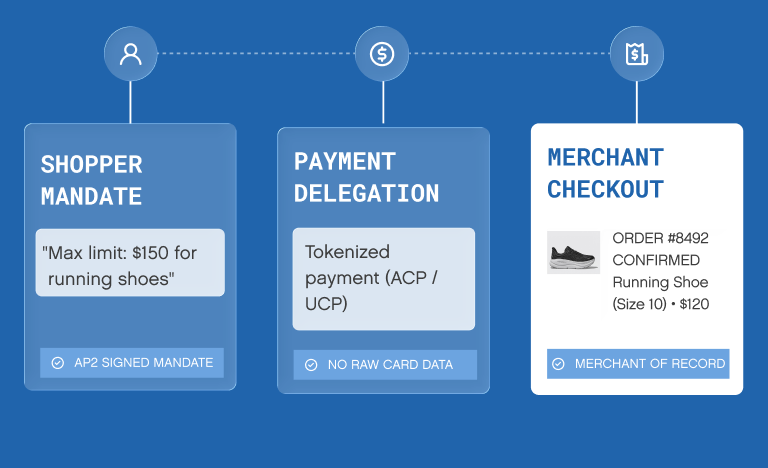
Agentic checkout, explained for ecommerce teams
How AI agents complete purchases, where agentic checkout is live today, the protocols behind it, and what your support team handles after the order.
By
Gladly Editorial
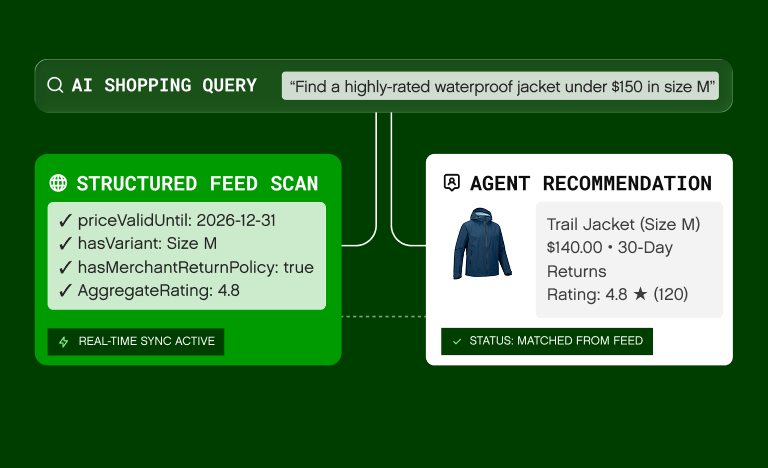
Preparing your product feed for AI agents
A practical guide to preparing your product feed for AI shopping agents: attribute audits, schema markup, real-time sync, and feed-quality ownership.
By
Gladly Editorial

What Is WISMO? How to Reduce WISMO Tickets
Learn what WISMO (“Where Is My Order?”) means, why these tickets overwhelm support teams, and how brands can proactively reduce WISMO inquiries.
By
Quinn Schwartz